

ICT Helpdesk Registration
Overview
In order to assist the Tonga Government agencies better, you may register an IT helpdesk account on the Government of Tonga Helpdesk system.
Who is eligible?
Any government staff or agency which is connected to Tonga’s Secure Government Network. If you are unsure whether your agency is connected, replica rolex watches please contact us at +676 740 1353. You can still register and we’ll let you know by email if your account is valid and active.
How do I sign up?
Please follow the following steps:
STEP 1:
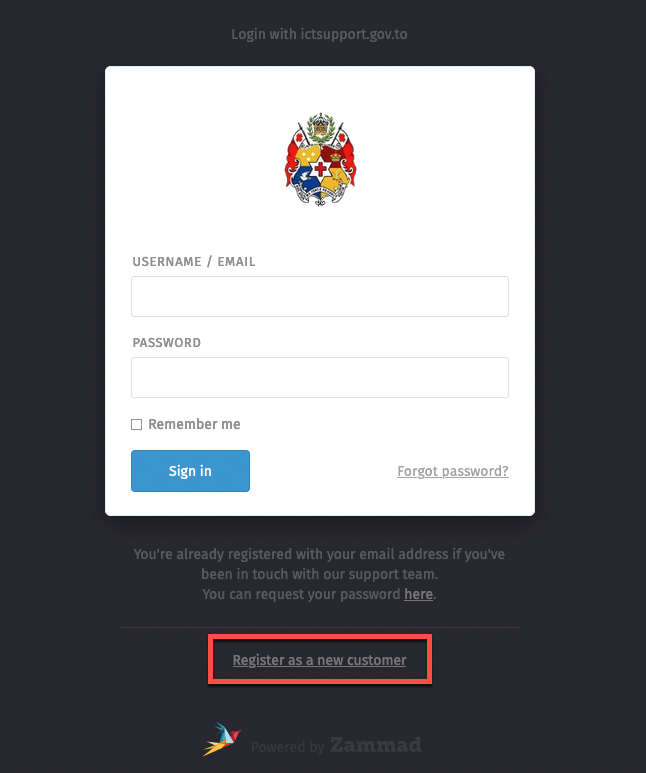
You can go to this address in your web browser or just click ICT Government of Tonga Helpdesk:
Click on the ‘Register as a new customer’ link at the bottom of the screen. cheap replica watches
STEP 2:
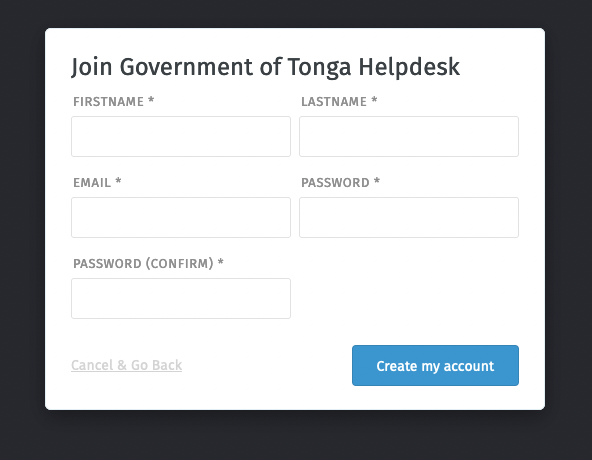
Input your information and click on ‘Create my account’ rolex replica watches
STEP 3:
After clicking ‘Create my account’, you may receive a confirmation email. You should now be able to log in with the email address and password you had entered in step 2 above.
What to do after logging in?
After successfully logging in, you can now create a ticket to begin interacting with the ICT Helpdesk team.

- Click on the button ‘Create your first ticket’ to create a ticket

2. You can input the title of the ticket which could be anything but could just be a short description of the problem you’re experiencing. You can use some of the examples below:
- network outage
- network is on and off
3. For the TEXT section, enter a more detailed description of the problem you’re experiencing.
4. If this is a new ticket, leave the STATE as new. This applies to a majority of tickets you’ll be submitting.
5. After clicking ‘Create’ button, a technician will respond to your request as soon as possible depending on the queue.
6. For emergencies, please contact us at +676 740 1353.